> ## Documentation Index
> Fetch the complete documentation index at: https://docs.sendflit.com/llms.txt
> Use this file to discover all available pages before exploring further.
# DNS guides
> Add the records SendFlit needs at your DNS provider. Pick your provider for a step-by-step guide.
SendFlit needs three DNS records to send from your domain. They prove you own the domain and let mailbox providers trust your mail. You add them at whoever hosts your DNS. The steps are the same everywhere, only the screens differ.
## The records
Each domain gets the records below. The dashboard shows the exact name and value for your domain, and that's the source of truth.
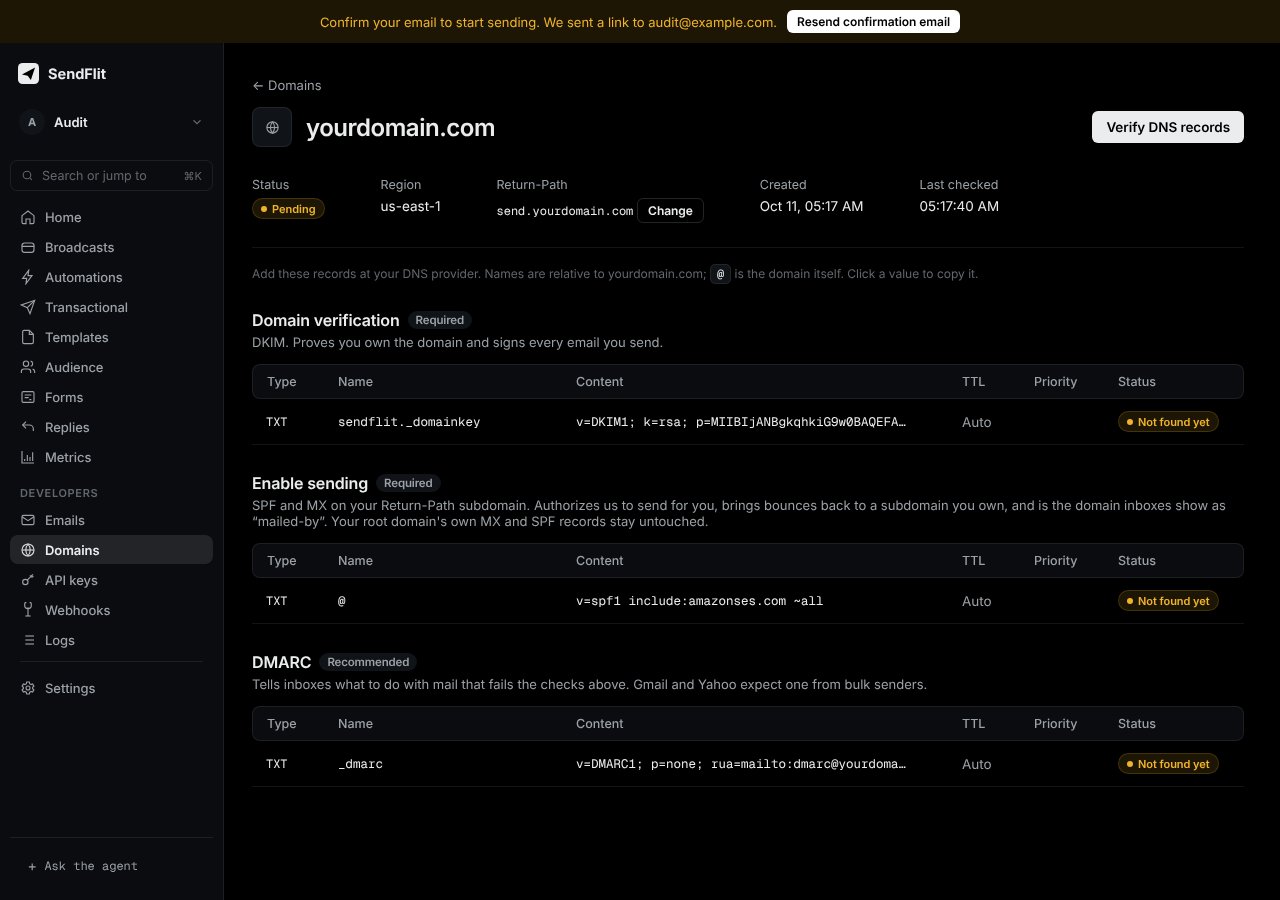 | Record | Type | Name | Purpose |
| - | - | - | - |
| DKIM | TXT | `sendflit._domainkey` | Signs your outgoing mail. Required. |
| Sending (SPF) | TXT | the **Enable sending** name shown in the dashboard | Authorizes SendFlit to send for your domain. Required. It's on your root domain or on your return-path subdomain, such as `send.yourdomain.com`. |
| DMARC | TXT | `_dmarc` | Tells mailbox providers what to do with mail that fails the checks. Recommended. |
If the dashboard shows an MX record for your return-path subdomain, publish it too. Your root domain's own MX records stay untouched.
## Common mistakes
* **Two SPF records.** A domain may have only one record that starts with `v=spf1` on the same name. Merge into the existing one.
* **Typing the full name twice.** Many providers add your domain automatically. Enter only the part before it, or `@` for the root.
* **Quotes around values.** Paste the value as-is. Some consoles add quotes themselves. Don't add a second pair.
* **Old records still cached.** Propagation can take up to a few hours. Wait, then verify again.
## Choose your provider
Your provider isn't listed? The steps are the same. Find the DNS page for your domain, add three TXT records using the table above, then verify.
This documentation is built and hosted on [Mintlify](https://mintlify.com), a developer documentation platform.
| Record | Type | Name | Purpose |
| - | - | - | - |
| DKIM | TXT | `sendflit._domainkey` | Signs your outgoing mail. Required. |
| Sending (SPF) | TXT | the **Enable sending** name shown in the dashboard | Authorizes SendFlit to send for your domain. Required. It's on your root domain or on your return-path subdomain, such as `send.yourdomain.com`. |
| DMARC | TXT | `_dmarc` | Tells mailbox providers what to do with mail that fails the checks. Recommended. |
If the dashboard shows an MX record for your return-path subdomain, publish it too. Your root domain's own MX records stay untouched.
## Common mistakes
* **Two SPF records.** A domain may have only one record that starts with `v=spf1` on the same name. Merge into the existing one.
* **Typing the full name twice.** Many providers add your domain automatically. Enter only the part before it, or `@` for the root.
* **Quotes around values.** Paste the value as-is. Some consoles add quotes themselves. Don't add a second pair.
* **Old records still cached.** Propagation can take up to a few hours. Wait, then verify again.
## Choose your provider
Your provider isn't listed? The steps are the same. Find the DNS page for your domain, add three TXT records using the table above, then verify.
This documentation is built and hosted on [Mintlify](https://mintlify.com), a developer documentation platform.